
Simple Twitter Analytics by Multivac “Data Science Lab” – Part I
I am going to analyse all of my Tweets since 2010 by using “Multivac DSL“. This tutorial will be in three parts. In first part I am going to do the followings:
- Read tweets in CSV format and convert them to Spark DataFrame
- Make some visualisations for better understanding
- Clean the “source” field
- Visualise the source of each tweet to find useful insights
First, I need to login to Apache Zeppelin hosted by Multivac with my ISC-PIF LDAP account. This allows me to have my Spark Notebooks run everything over Multivac Hadoop cluster in our cloud. Now it’s time to get our hands on some tweets. For this, I am going to request my Twitter archive from my Twitter profile. Once this request has been sent it will be processed by Twitter and you will receive an email with a link to download.
This is what’s inside the compressed directory that I downloaded:

You can see Twitter has already prepared a nice HTML page to browse your tweets:
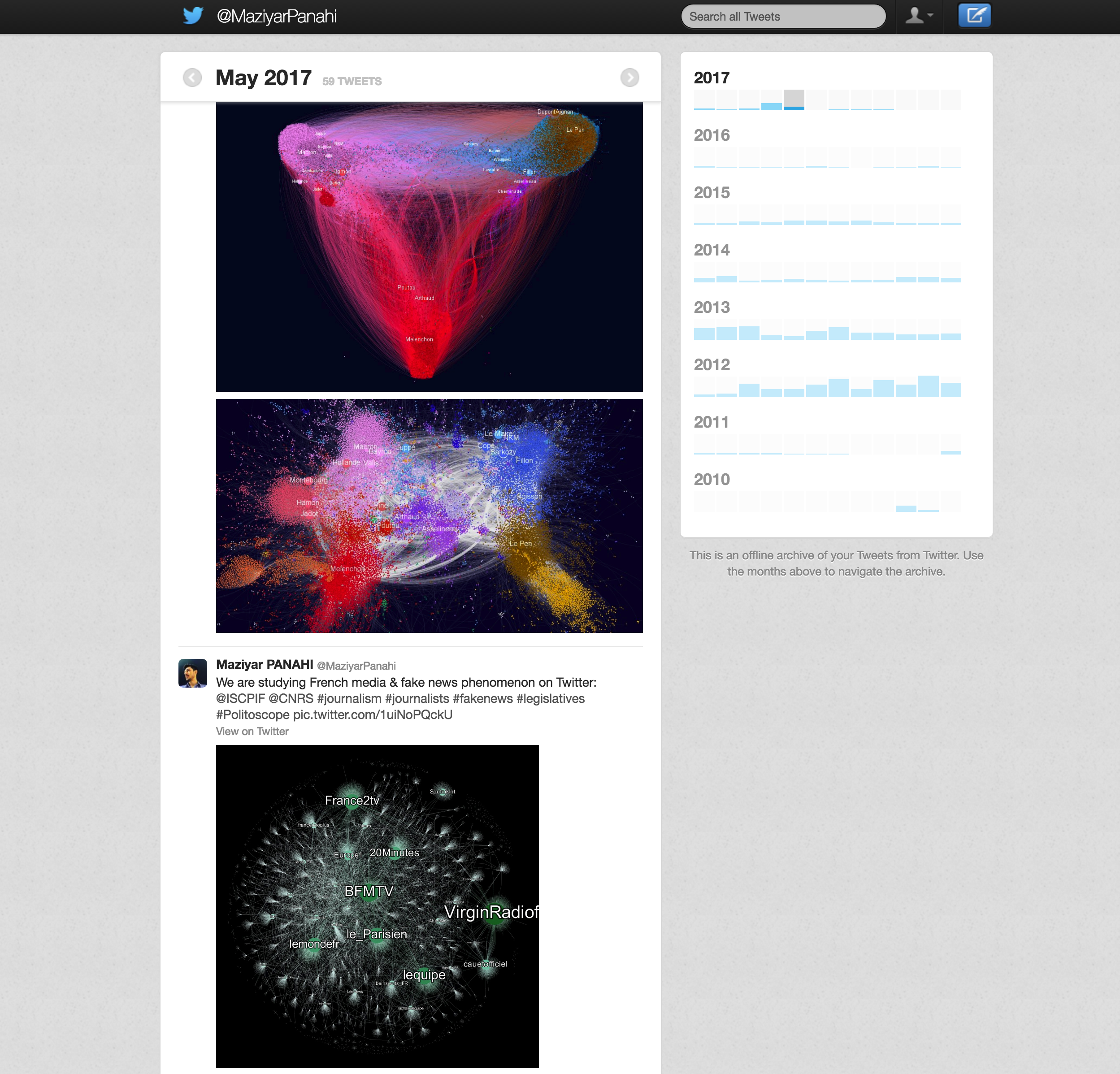
But we will focus on one particular file named “tweets.csv” which contains the content of your tweets with some minimal metadata. Spark has the ability to easily read CSV or JSON files as Spark DataFrame.
First, let’s take a look at our Spark version in our cluster:
spark.version
res0: String = 2.2.0.cloudera1
Now here’s how you can read CSV file into DataFrame:
val tweetDF = spark.read.format("csv")
.option("header", "true") //file comes with headers, use them as the name of each column
.option("charset", "UTF-8")//the tweets are in UTF-8 so we just making sure of it
.option("qoute", null)//this is important cause some thweets contain double quotations and this messes the rows in SQL
.option("mode", "DROPMALFORMED")//forget the corrupted rows
.load("/tmp/tweets.csv")// load the CSV file
Now the “tweetDF” variable contains our Tweets DataFrame. Let’s take a look at schema and display 20 rows of this table:
tweetDF.printSchema
root
 |-- tweet_id: string (nullable = true)
 |-- in_reply_to_status_id: string (nullable = true)
 |-- in_reply_to_user_id: string (nullable = true)
 |-- timestamp: string (nullable = true)
 |-- source: string (nullable = true)
 |-- text: string (nullable = true)
 |-- retweeted_status_id: string (nullable = true)
 |-- retweeted_status_user_id: string (nullable = true)
 |-- retweeted_status_timestamp: string (nullable = true)
 |-- expanded_urls: string (nullable = true)
tweetDF.count // how many rows exist in this DataFrame
res2: Long = 5590

tweetDF.show //display 20 rows
+------------------+---------------------+-------------------+--------------------+--------------------+--------------------+-------------------+------------------------+--------------------------+--------------------+
|          tweet_id|in_reply_to_status_id|in_reply_to_user_id|           timestamp|              source|                text|retweeted_status_id|retweeted_status_user_id|retweeted_status_timestamp|       expanded_urls|
+------------------+---------------------+-------------------+--------------------+--------------------+--------------------+-------------------+------------------------+--------------------------+--------------------+
|895576868539314176|   895572859447332864|           48308882|2017-08-10 09:25:...|"<a href=""http:/...|@G3rf0x @netflix ...|               null|                    null|                      null|                null|
|894556881552908288|                 null|               null|2017-08-07 13:52:...|"<a href=""http:/...|Indexing +100M @n...|               null|                    null|                      null|https://twitter.c...|
|890613499495370754|   881867404875358209|         3890708435|2017-07-27 16:42:...|"<a href=""http:/...|@GeoMaisonobe @Em...|               null|                    null|                      null|                null|
|884406660458053632|                 null|               null|2017-07-10 13:39:...|"<a href=""https:...|RT @multivacsuppo...| 884406059489783809|      818419470473498624|      2017-07-10 13:36:...|                null|
|883250853238497282|   882218484742201344|         3890708435|2017-07-07 09:06:...|"<a href=""http:/...|@GeoMaisonobe @Em...|               null|                    null|                      null|                null|
|881900338323881985|   881867404875358209|         3890708435|2017-07-03 15:40:...|"<a href=""http:/...|@GeoMaisonobe @Em...|               null|                    null|                      null|                null|
|881899963189534720|   881867404875358209|         3890708435|2017-07-03 15:38:...|"<a href=""http:/...|@GeoMaisonobe @Em...|               null|                    null|                      null|                null|
|881858875561046017|   881857513888600064|         3890708435|2017-07-03 12:55:...|"<a href=""http:/...|@GeoMaisonobe @Em...|               null|                    null|                      null|                null|
|867330936693829633|   867330008322375681|          572447555|2017-05-24 10:46:...|"<a href=""http:/...|@auberiemrc @mult...|               null|                    null|                      null|                null|
|865897556433358848|                 null|               null|2017-05-20 11:50:...|"<a href=""http:/...|Reconfiguration d...|               null|                    null|                      null|https://politosco...|
|865519971635314689|                 null|               null|2017-05-19 10:50:...|"<a href=""http:/...|We are studying F...|               null|                    null|                      null|https://twitter.c...|
|864846964470538241|                 null|               null|2017-05-17 14:15:...|"<a href=""http:/...|Que dit Twitter à...|               null|                    null|                      null|https://twitter.c...|
|864732912792608768|                 null|               null|2017-05-17 06:42:...|"<a href=""http:/...|L'équipe ISC-PIF ...|               null|                    null|                      null|https://twitter.c...|
|864362990526545921|                 null|               null|2017-05-16 06:12:...|"<a href=""http:/...|RT @chavalarias: ...| 864263262313041921|                97267781|      2017-05-15 23:36:...|https://politosco...|
|864151163989610500|                 null|               null|2017-05-15 16:11:...|"<a href=""http:/...|"Graph of mention...|               null|                    null|                      null|https://twitter.c...|
|864107860036341761|                 null|               null|2017-05-15 13:19:...|"<a href=""http:/...|"Who's talking ab...|               null|                    null|                      null|https://twitter.c...|
|864106463777755136|                 null|               null|2017-05-15 13:13:...|"<a href=""http:/...|"What does French...|               null|                    null|                      null|https://twitter.c...|
|864091533968015360|   864088698970939396|          392755065|2017-05-15 12:14:...|"<a href=""https:...|@ISCPIF everythin...|               null|                    null|                      null|                null|
|863302644449849347|                 null|               null|2017-05-13 07:59:...|"<a href=""http:/...|ISC-PIF/CNRS is p...|               null|                    null|                      null|https://multivac....|
|862540789729153024|                 null|               null|2017-05-11 05:32:...|"<a href=""http:/...|RT @dadoonet: w00...| 862222612977635328|                51172224|      2017-05-10 08:27:...|https://twitter.c...|
+------------------+---------------------+-------------------+--------------------+--------------------+--------------------+-------------------+------------------------+--------------------------+--------------------+
only showing top 20 rows
As you can see there is column named “source” that indicates the medium which I posted my Tweets (iPhone, Web, third-party applications, etc.).
This is how it looks like:
tweetDF.groupBy("source").count.sort($"count".desc).show(false)
+------------------------------------------------------------------------------------------------------------------------------+-----+
|source                                                                                                                        |count|
+------------------------------------------------------------------------------------------------------------------------------+-----+
|"<a href=""http://www.flipboard.com"" rel=""nofollow"">Flipboard</a>"                                                         |1721 |
|"<a href=""http://foursquare.com"" rel=""nofollow"">Foursquare</a>"                                                           |608  |
|"<a href=""http://twitter.com/download/iphone"" rel=""nofollow"">Twitter for iPhone</a>"                                      |434  |
|"<a href=""http://instagram.com"" rel=""nofollow"">Instagram</a>"                                                             |376  |
|"<a href=""http://twitter.com"" rel=""nofollow"">Twitter Web Client</a>"                                                      |375  |
|"<a href=""http://www.scoop.it"" rel=""nofollow"">Scoop.it</a>"                                                               |365  |
|"<a href=""http://bufferapp.com"" rel=""nofollow"">Buffer</a>"                                                                |358  |
|"<a href=""https://dev.twitter.com/docs/tfw"" rel=""nofollow"">Twitter for Websites</a>"                                      |355  |
|"<a href=""http://www.apple.com"" rel=""nofollow"">iOS</a>"                                                                   |301  |
|"<a href=""http://www.pulse.me"" rel=""nofollow"">Pulse News</a>"                                                             |117  |
|"<a href=""http://itunes.apple.com/us/app/bbc-news/id364147881?mt=8&uo=4"" rel=""nofollow"">BBC News on iOS</a>"              |93   |
|"<a href=""https://vimeo.com"" rel=""nofollow"">Vimeo</a>"                                                                    |71   |
|"<a href=""http://www.apple.com/"" rel=""nofollow"">OS X</a>"                                                                 |57   |
|"<a href=""https://about.twitter.com/products/tweetdeck"" rel=""nofollow"">TweetDeck</a>"                                     |47   |
|"<a href=""http://www.linkedin.com/"" rel=""nofollow"">LinkedIn</a>"                                                          |39   |
|"<a href=""http://spotify.com"" rel=""nofollow"">Spotify</a>"                                                                 |32   |
|"<a href=""http://itunes.apple.com/us/app/feedly/id396069556?mt=8&uo=4"" rel=""nofollow"">feedly on iOS</a>"                  |29   |
|"<a href=""http://www.foxnews.com"" rel=""nofollow"">Fox News</a>"                                                            |25   |
|"<a href=""http://klout.com"" rel=""nofollow"">Post with Klout</a>"                                                           |18   |
|"<a href=""http://itunes.apple.com/us/app/google-currents/id459182288?mt=8&uo=4"" rel=""nofollow"">Google Currents on iOS</a>"|17   |
+------------------------------------------------------------------------------------------------------------------------------+-----+
only showing top 20 rows
As it can be seen, it’s not much of a help. It’s even hard to read with all the HTML tags let along to be any use for any aggregation. So I am going to clean up the HTML tag with a simple regex wrapped around Spark UDF:
//define a UDF to replace HTML tags and lowercase the content
def extractTweetSourceUDF = udf { tweet: String =>
  tweet.replaceAll("<[^>]*>", "").toLowerCase()
}
You can read more about Spark UDF here, but simply it’s a function that can be applied over DataFrame (one or more columns).
Now let’s run the UDF over our DataFrame: tweetDF
val newTweetDF = tweetDF
.filter("source IS NOT null")//make sure the source is not empty
.withColumn("cleanSource", extractTweetSourceUDF(col("source")))//apply the UDF and create a new column name cleanSource to contain the results
Displaying our new column: cleanSource
newTweetDF.select("cleanSource").show(false)
+--------------------+
|cleanSource         |
+--------------------+
|"twitter for iphone"|
|"twitter web client"|
|"twitter for iphone"|
|"tweetdeck"         |
|"twitter for iphone"|
|"twitter web client"|
|"twitter web client"|
|"twitter web client"|
|"twitter for iphone"|
|"twitter web client"|
|"twitter web client"|
|"twitter web client"|
|"twitter for iphone"|
|"twitter for iphone"|
|"twitter web client"|
|"twitter web client"|
|"twitter web client"|
|"tweetdeck"         |
|"twitter for iphone"|
|"twitter for iphone"|
+--------------------+
only showing top 20 rows
It’s better now! We can use some aggregations with this and see some insights.
Let’s see the top 20 sources I have ever used to post my tweets:
newTweetDF.groupBy("cleanSource").count.sort($"count".desc).show(false)
+------------------------+-----+
|cleanSource             |count|
+------------------------+-----+
|"flipboard"             |1721 |
|"foursquare"            |608  |
|"twitter for iphone"    |434  |
|"instagram"             |376  |
|"twitter web client"    |375  |
|"scoop.it"              |365  |
|"buffer"                |358  |
|"twitter for websites"  |355  |
|"ios"                   |301  |
|"pulse news"            |117  |
|"bbc news on ios"       |93   |
|"vimeo"                 |71   |
|"os x"                  |57   |
|"tweetdeck"             |47   |
|"linkedin"              |39   |
|"spotify"               |32   |
|"feedly on ios"         |29   |
|"fox news"              |25   |
|"post with klout"       |18   |
|"google currents on ios"|17   |
+------------------------+-----+
only showing top 20 rows
Let’s visualise this with built-in charts in Zeppelin. But before doing that I am going to create a temporary view in Spark so I can run SQL queries in another block:
newTweetDF.createOrReplaceTempView("MyTweets")
Now I can run SQL statements by simply using %sql in my notebooks:
%sql
SELECT cleanSource, count(1) as TotalCount
FROM MyTweets
GROUP BY cleanSource
ORDER BY TotalCount DESC
LIMIT 10
This is the results:
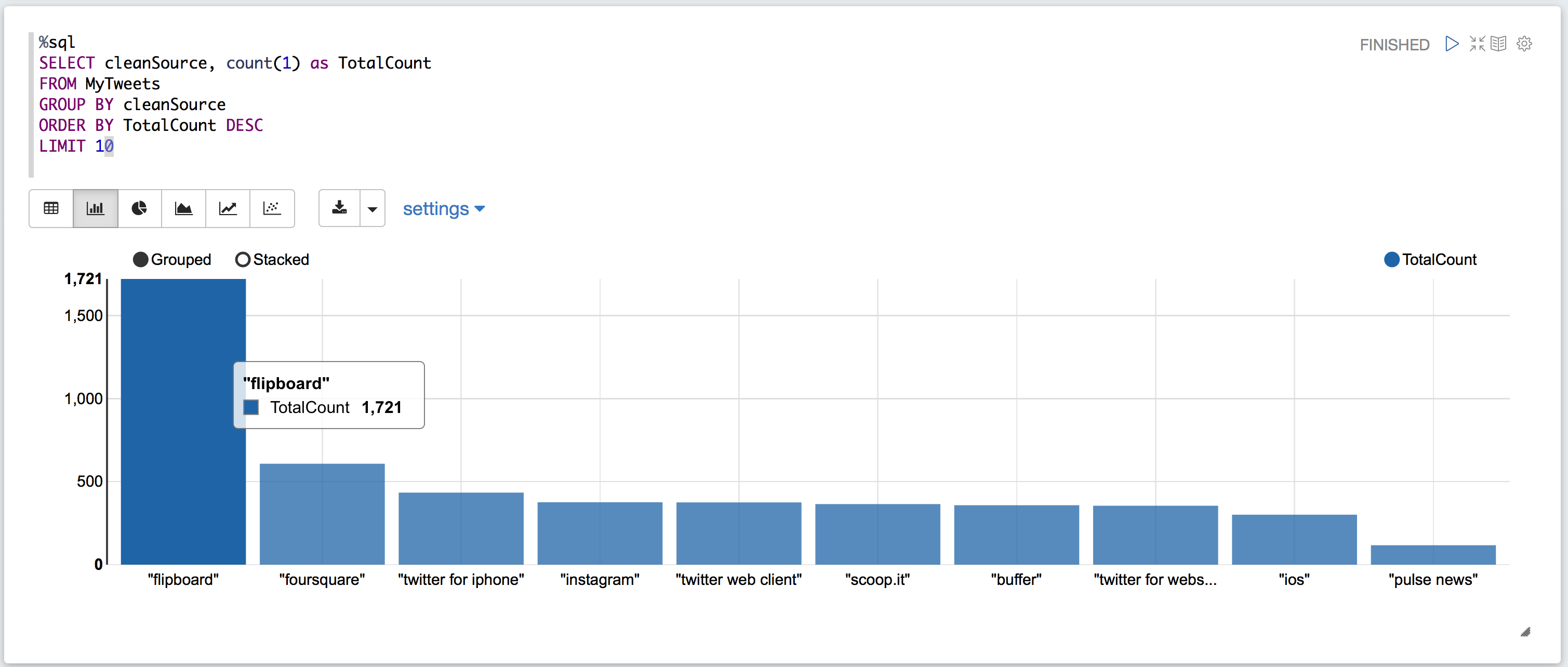
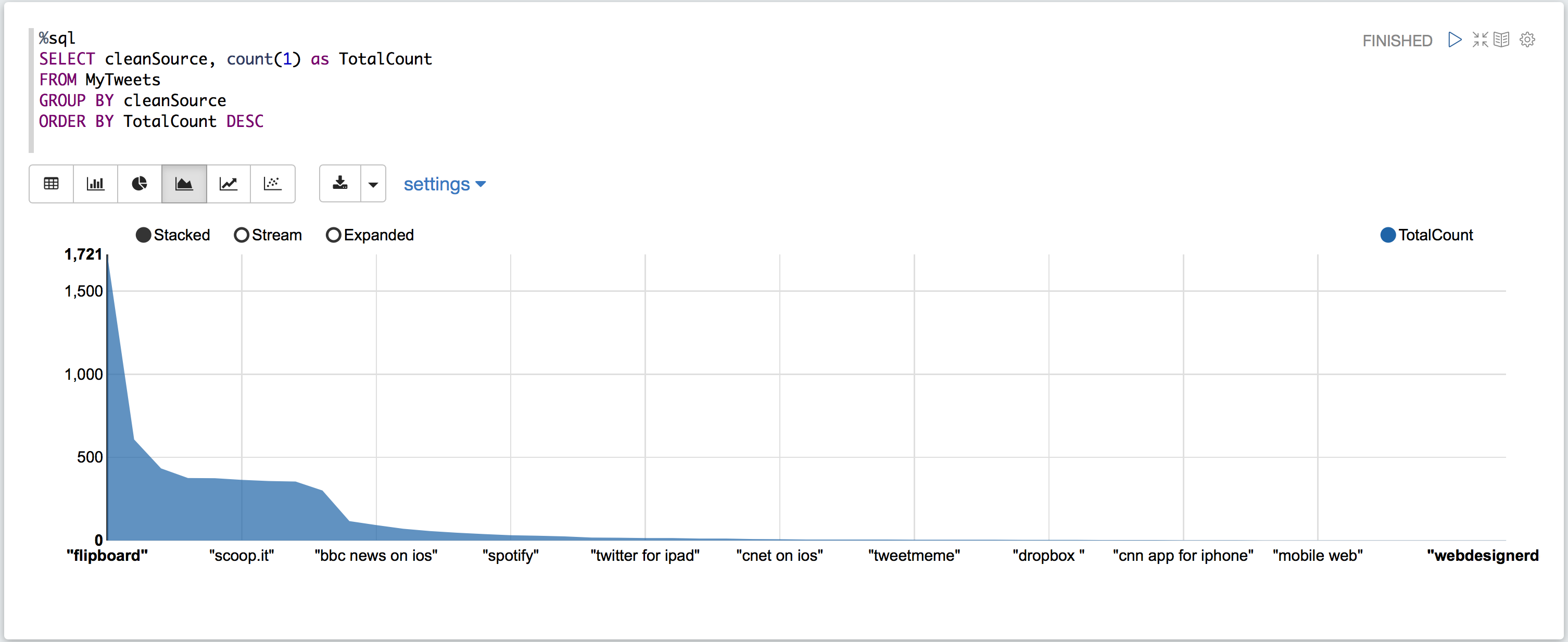
OK! I don’t remember the last time I used “Flipboard” to share something on Twitter. Let’s see a histogram of my Twitter activity first before we go and see where this Flipboard thing is coming from:
%sql
SELECT year(timestamp) as YEAR, count(*) as COUNT
FROM MyTweets
GROUP BY YEAR
ORDER BY YEAR DESC
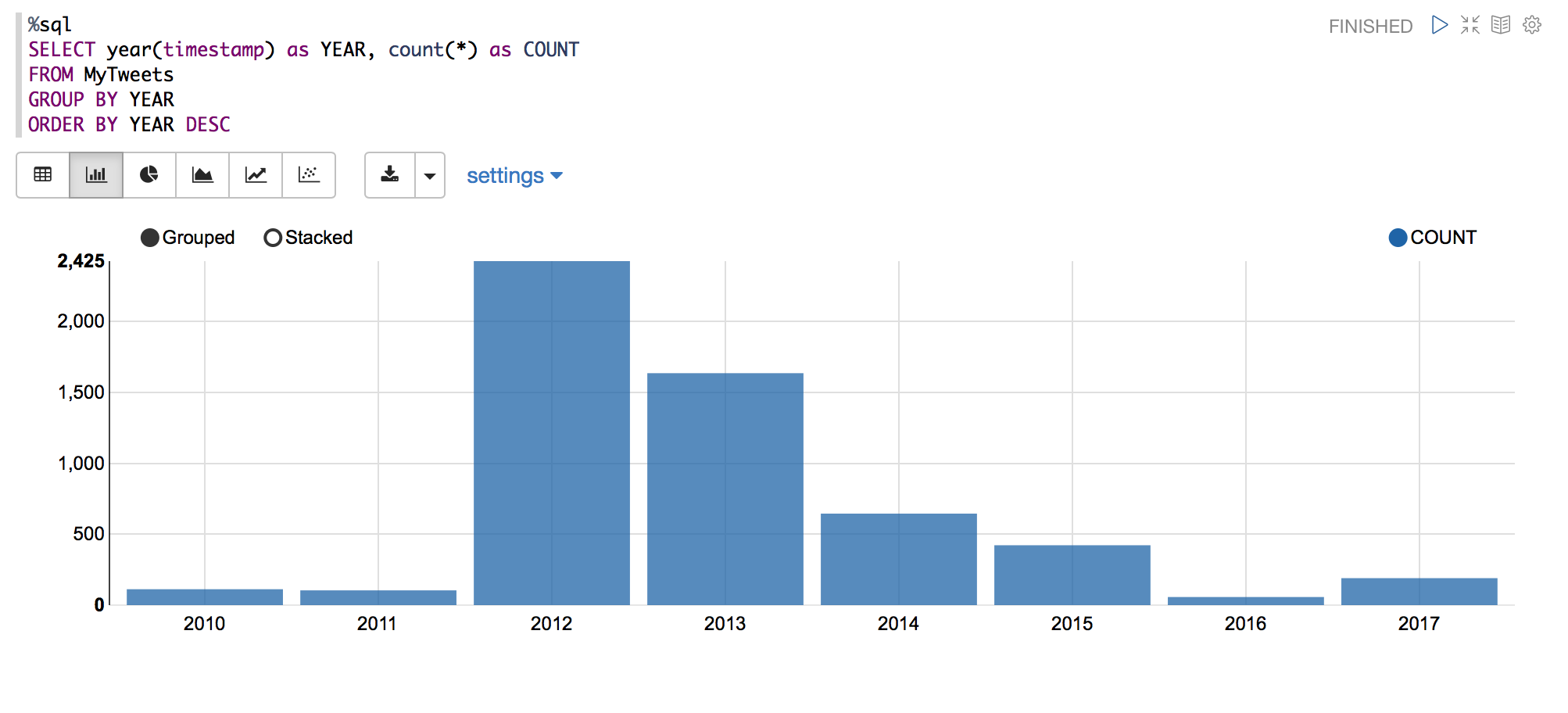
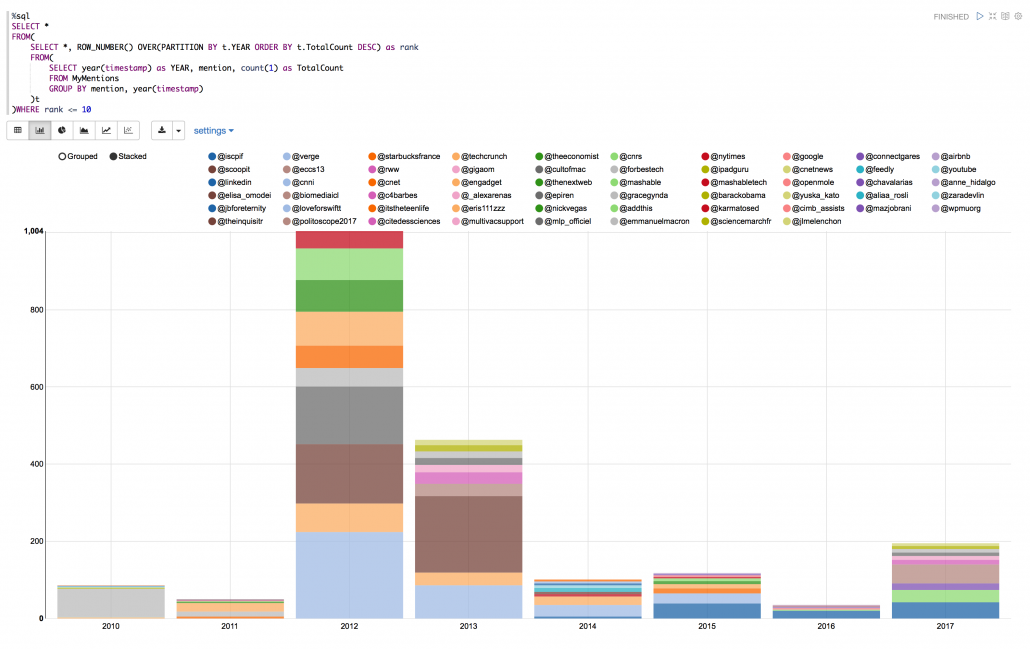
OK! I was very active during 2012 and 2013. Let’s see the same thing but instead of Twitter activity I am going to see the top sources I used to tweet from by year:
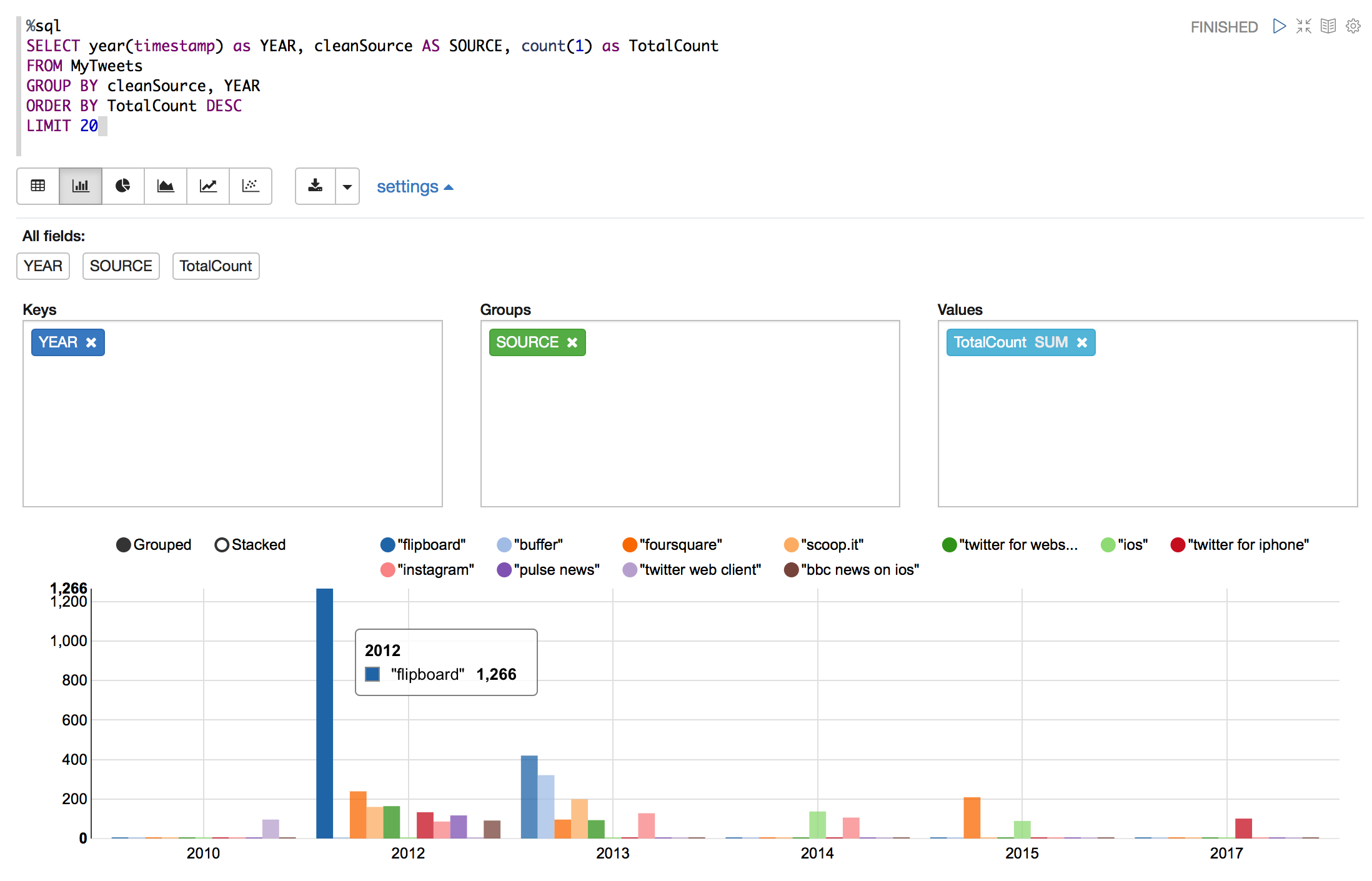
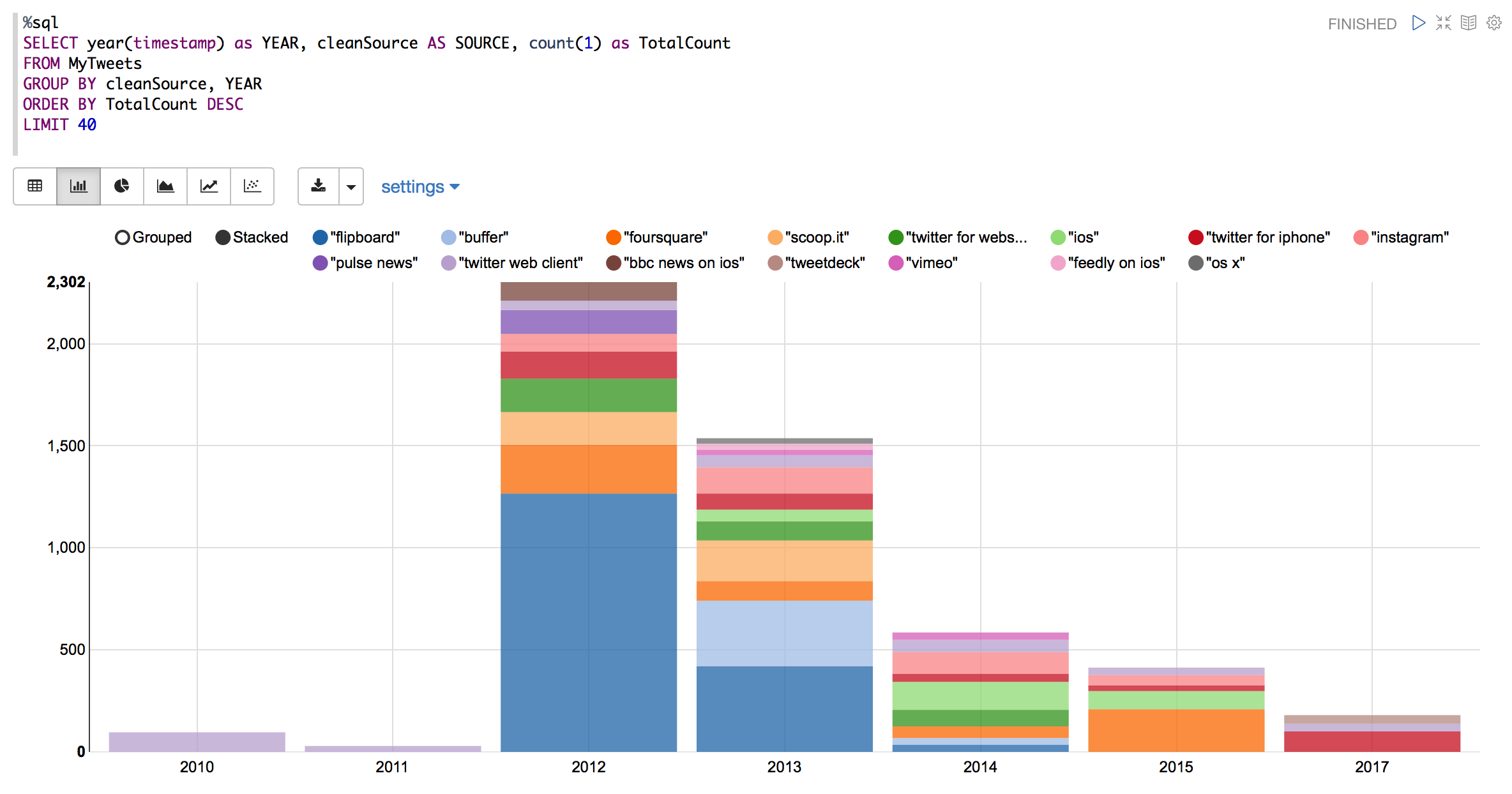
Alright! Apparently I used to be a fan of “Flipboard” back in 2012 and after that my usage of this source dropped almost to zero by 2015.
Looking at my Twitter activity (I was very active during 2012-2013) and looking at the yearly source of my tweets can explain my surprise of why my top source of Tweeting is “Flipboard”.
In the second part I am going to take a look at hashtags, accounts I mentioned, original tweets vs retweeted tweets and some word processing to understand what I have mostly focused when I was on Twitter.


Leave a Reply
Want to join the discussion?Feel free to contribute!